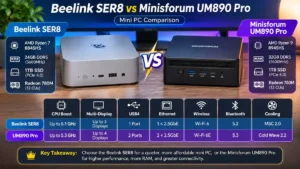
The Beelink SER8 vs Minisforum UM890 Pro comparison brings together two powerful AMD mini PCs designed for users who need desktop-level capabilities in a compact form factor. Both models use modern AMD Ryzen processors, integrated Radeon 780M graphics, DDR5 memory, and PCIe 4.0 storage.
However, they target slightly different priorities.
The Beelink SER8 configuration considered in this comparison includes an AMD Ryzen 7 8845HS processor, 24GB of DDR5 RAM, and a 1TB SSD. The Minisforum UM890 Pro configuration comes with an AMD Ryzen 9 8945HS, 32GB of DDR5 RAM, and a 1TB SSD.
At first glance, the Minisforum appears more powerful because of its Ryzen 9 processor and larger memory configuration. But processor specifications alone do not determine the best mini PC. Connectivity, cooling, expandability, graphics performance, and price also matter.
In this comparison, we examine the differences to help you decide which model better fits your needs.
Before looking at real-world use cases, here is a side-by-side comparison of the two configurations.
| Specification | Beelink SER8 | Minisforum UM890 Pro |
|---|---|---|
| Processor | AMD Ryzen 7 8845HS | AMD Ryzen 9 8945HS |
| CPU Architecture | Zen 4 | Zen 4 |
| CPU Cores | 8 | 8 |
| CPU Threads | 16 | 16 |
| Maximum CPU Frequency | Up to 5.1GHz | Up to 5.3GHz |
| Integrated Graphics | Radeon 780M | Radeon 780M |
| GPU Frequency | Up to 2700MHz | Up to 2800MHz |
| RAM Included | 24GB DDR5 | 32GB DDR5 |
| RAM Speed | 5600MHz | Up to 5600MHz |
| Storage Included | 1TB PCIe 4.0 SSD | 1TB PCIe 4.0 SSD |
| Storage Expansion | 2 × M.2 slots | 2 × M.2 slots |
| USB4 | 1 port | 2 ports |
| HDMI | HDMI 2.1 | HDMI 2.1 |
| DisplayPort | DisplayPort 1.4 | DisplayPort 1.4 |
| Ethernet | 2.5GbE | 2 × 2.5GbE |
| Wireless | Wi-Fi 6 | Wi-Fi 6E |
| Bluetooth | 5.2 | 5.3 |
| Cooling | MSC 2.0 | Cold Wave 2.2 |
| Multi-display Support | Up to 3 displays | Up to 4 displays |
Specifications can vary by product configuration, region, and hardware revision. The RAM and storage capacities shown above refer to the specific configurations being compared, not the maximum supported capacities.
Check Price on Amazon — Beelink SER8
Check Price on Amazon — Minisforum UM890 Pro
1. Beelink SER8 vs Minisforum UM890 Pro: Processor Performance
The processor is one of the most important differences between these two mini PCs.
The Beelink SER8 uses the AMD Ryzen 7 8845HS, while the Minisforum UM890 Pro is equipped with the AMD Ryzen 9 8945HS.
Both processors belong to AMD’s Ryzen 8000 mobile series and use the Zen 4 architecture. They feature 8 cores and 16 threads, making them suitable for demanding multitasking and professional workloads.
Beelink SER8: AMD Ryzen 7 8845HS
The Ryzen 7 8845HS offers:
- 8 CPU cores and 16 threads.
- Zen 4 architecture.
- Maximum boost frequency of up to 5.1GHz.
- 16MB of L3 cache.
- Integrated Radeon 780M graphics.
- Integrated Ryzen AI capabilities.
This processor provides enough computing power for office applications, programming, software development, multitasking, and many productivity workloads.
It is particularly suitable for users who want a capable desktop replacement without paying for a higher-tier processor they may not fully use.
Minisforum UM890 Pro: AMD Ryzen 9 8945HS
The Ryzen 9 8945HS offers:
- 8 CPU cores and 16 threads.
- Zen 4 architecture.
- Maximum boost frequency of up to 5.3GHz.
- 16MB of L3 cache.
- Integrated Radeon 780M graphics.
- Integrated Ryzen AI capabilities.
The Ryzen 9 8945HS is the higher-tier processor in this comparison. Its higher maximum boost frequency gives the Minisforum a potential advantage in CPU-intensive workloads.
However, the difference should not be exaggerated. Both processors have the same core and thread count and share the same architecture.
Actual performance also depends on power limits, cooling, firmware settings, and workload duration.
Processor Verdict: The Minisforum UM890 Pro has the stronger processor on paper. The Beelink SER8 remains a capable alternative for everyday productivity and demanding general-purpose tasks.
2. RAM Comparison: 24GB vs 32GB DDR5
Memory capacity is another important difference between these configurations.
The Beelink SER8 comes with 24GB of DDR5 memory, while the Minisforum UM890 Pro configuration includes 32GB.
Both use DDR5 memory technology, with speeds of up to 5600MHz depending on the configuration.
Is 24GB Enough for the Beelink SER8?
For most users, 24GB is sufficient for:
- Office applications.
- Web browsing with multiple tabs.
- Programming and development environments.
- Video conferencing.
- General multitasking.
- Lightweight photo editing.
However, users working with several virtual machines, large datasets, or memory-intensive creative applications may benefit from additional RAM.
Does 32GB Make the UM890 Pro Better?
The UM890 Pro’s 32GB configuration offers more memory headroom.
This is useful when running multiple applications simultaneously, working with larger projects, or using development tools that consume significant memory.
The extra 8GB does not automatically make every application faster. Its main advantage is reducing the likelihood of memory limitations during demanding multitasking.
RAM Expandability
Both manufacturers advertise two SO-DIMM memory slots for their respective SER8 and UM890 Pro product lines.
Beelink advertises a high maximum memory capacity for the SER8, while Minisforum lists support for up to 96GB on the UM890 Pro.
These maximum capacities should be checked against the exact hardware revision and memory compatibility list before purchasing additional modules.
RAM Verdict: The Minisforum UM890 Pro wins in the configurations compared here because it includes 32GB instead of 24GB. The difference matters most for heavy multitasking and professional workloads.
3. Storage Comparison: 1TB PCIe 4.0 SSD
Both mini PCs include a 1TB PCIe 4.0 SSD in the configurations considered.
This means neither model has an immediate capacity advantage.
A 1TB SSD provides enough space for:
- Windows and applications.
- Development environments.
- Office documents.
- Photos and videos.
- Games and personal files.
Beelink SER8 Storage
The Beelink SER8 supports two M.2 2280 PCIe 4.0 SSD slots according to the manufacturer’s specifications.
This provides an upgrade path for users who need more storage capacity.
Minisforum UM890 Pro Storage
The UM890 Pro also provides two M.2 2280 PCIe 4.0 SSD slots.
This makes it suitable for users who want to expand their storage without relying entirely on external drives.
Which Mini PC Offers Better Storage Expandability?
Both models offer two M.2 slots, so their basic internal storage expansion capabilities are similar.
The actual supported capacity depends on compatible SSDs and the manufacturer’s specifications for the exact revision.
Storage Verdict: It is a tie. Both configurations include a 1TB SSD and provide two M.2 storage slots.
4. Graphics Performance: AMD Radeon 780M
Both mini PCs use the AMD Radeon 780M integrated GPU.
This is an important detail because the difference between their processors does not translate into a completely different graphics experience.
The Radeon 780M is based on AMD’s RDNA 3 architecture and features 12 graphics compute units.
The manufacturer’s listed maximum graphics frequency is:
- Beelink SER8: up to 2700MHz.
- Minisforum UM890 Pro: up to 2800MHz.
The difference in listed frequency is relatively small. It should not be interpreted as proof that the Minisforum will deliver significantly better gaming performance.
Gaming Performance
Both mini PCs can handle lighter games and selected modern titles with appropriate graphics settings.
They are suitable for:
- Esports titles.
- Indie games.
- Older PC games.
- Casual gaming.
- Some modern games at reduced settings.
However, integrated Radeon 780M graphics should not be confused with a dedicated gaming GPU.
Performance depends on memory configuration, power limits, cooling, game optimization, and resolution.
Users planning to play demanding AAA games at high settings should consider a computer with a dedicated graphics card.
Can the Minisforum UM890 Pro Be Expanded with an External GPU?
The UM890 Pro includes an OCuLink interface, which provides an expansion option for compatible external GPU solutions.
This can be interesting for users who want to explore additional graphics performance.
However, an OCuLink connection does not mean that a desktop graphics card is included. An external GPU setup requires additional compatible hardware and may involve extra costs.
Graphics Verdict: Both mini PCs use the Radeon 780M, so neither has a decisive graphics advantage. The UM890 Pro’s OCuLink connectivity gives it an additional expansion option.
5. Cooling and Noise: MSC 2.0 vs Cold Wave 2.2
Cooling is particularly important in compact computers because their small enclosures limit the space available for heat dissipation.
Beelink and Minisforum use different cooling designs to maintain performance under demanding workloads.
Beelink SER8: MSC 2.0 Cooling
The Beelink SER8 uses the MSC 2.0 cooling system.
Its design includes:
- Vapor chamber cooling.
- An internal cooling fan.
- SSD heat dissipation.
- An airflow design intended to maintain stable operation.
Beelink advertises near-silent operation and a noise level of approximately 32dB under its stated conditions.
Actual noise depends on ambient temperature, workload, fan behavior, and system configuration.
Minisforum UM890 Pro: Cold Wave 2.2 Cooling
The Minisforum UM890 Pro uses the Cold Wave 2.2 cooling system.
Its cooling design includes:
- A dedicated cooling fan.
- Heat pipes.
- Active cooling for memory and SSD components.
- Airflow improvements intended to control temperatures under load.
Minisforum advertises a noise level of approximately 43dB in its performance-mode conditions.
This figure should not be compared directly with Beelink’s advertised 32dB because the manufacturers may use different testing environments and operating modes.
Which Cooling System Is Better?
Both systems are designed to manage the heat generated by their respective processors.
The Beelink emphasizes quiet operation, while Minisforum highlights cooling support for its higher-power performance configuration.
For users who prioritize a quiet working environment, the SER8’s advertised noise characteristics are attractive.
For users who frequently run demanding workloads, the UM890 Pro’s cooling design is worth considering.
Cooling Verdict: There is no reliable direct winner based only on the manufacturers’ noise figures. Real-world testing under identical conditions would be needed for a fair comparison.
6. Connectivity and Ports: Which Mini PC Is More Flexible?
Connectivity is one of the strongest arguments in favor of the Minisforum UM890 Pro.
Both mini PCs provide modern connectivity, but their port configurations are different.
Beelink SER8 Connectivity
The SER8 provides:
- 1 × USB4 port.
- USB-A ports.
- 1 × USB-C port.
- HDMI 2.1.
- DisplayPort 1.4.
- 2.5GbE Ethernet.
- Wi-Fi 6.
- Bluetooth 5.2.
The USB4 port supports high-speed data transfer and display connectivity.
This configuration is suitable for users connecting external storage, monitors, keyboards, mice, and other common desktop peripherals.
Minisforum UM890 Pro Connectivity
The UM890 Pro offers:
- 2 × USB4 ports.
- 4 × USB-A ports.
- HDMI 2.1.
- DisplayPort 1.4.
- 2 × 2.5GbE Ethernet ports.
- Wi-Fi 6E.
- Bluetooth 5.3.
- OCuLink interface.
The two USB4 ports provide more flexibility for users who connect several high-speed devices.
The dual 2.5GbE Ethernet ports are particularly useful for networking applications, home servers, and certain professional environments.
Why Are Dual 2.5GbE Ports Useful?
Two 2.5GbE ports can be useful for:
- Network-intensive workflows.
- Connecting to different network segments.
- Certain server and router configurations.
- Specialized networking projects.
They are not necessary for every user, but they provide additional flexibility.
Connectivity Verdict: The Minisforum UM890 Pro is the clear winner. It offers two USB4 ports, dual 2.5GbE Ethernet, Wi-Fi 6E, and OCuLink.
7. Multi-Monitor Support: Three Displays vs Four Displays
Multi-monitor support can be an important factor for professionals who need more screen space.
The Beelink SER8 supports up to three displays through its HDMI 2.1, DisplayPort 1.4, and USB4 connectivity.
The Minisforum UM890 Pro supports up to four displays through its available video outputs.
Beelink SER8 for Multi-Monitor Workstations
Three displays are sufficient for many professional setups.
For example, a user could dedicate one screen to a main application, another to documentation, and a third to communication or monitoring tools.
Minisforum UM890 Pro for Multi-Monitor Workstations
The UM890 Pro supports up to four simultaneous displays according to Minisforum.
This makes it more attractive for users who work with several dashboards, spreadsheets, development tools, or monitoring interfaces.
Actual display resolution and refresh rate depend on the output used, the connected monitors, and the system configuration.
Display Verdict: The Minisforum UM890 Pro is the better choice for users who need four simultaneous displays. The SER8 remains sufficient for most three-monitor workstations.
8. Design and Form Factor
Both products follow the same general concept: desktop performance in a compact enclosure.
Their small dimensions make them suitable for desks with limited space, office environments, and minimalist workstation setups.
Beelink SER8 Design
The SER8 has a compact metal enclosure with a design focused on cooling and everyday desktop use.
Its small footprint makes it easy to place beside a monitor or under a desk.
The metal construction also contributes to its overall appearance and helps integrate the device into a professional workspace.
Minisforum UM890 Pro Design
The UM890 Pro also uses a compact enclosure, with its design focused on connectivity and internal expansion.
Its larger selection of ports makes it particularly practical for users who want to connect several peripherals directly to the mini PC.
Both models are easier to accommodate than traditional desktop towers.
Design Verdict: Both are compact desktop alternatives. The better choice depends more on port requirements and workspace preferences than on size alone.
9. Productivity and Professional Use
The best mini PC is not necessarily the one with the highest processor specifications. It is the one that handles the user’s actual workload efficiently.
Which Mini PC Is Better for Office Work?
Both models are more than capable of handling typical office tasks.
These include:
- Microsoft Office applications.
- Web browsing.
- Email and communication.
- Video conferencing.
- Document management.
- Multiple browser tabs.
The Beelink SER8’s 24GB of RAM is sufficient for many office users.
The UM890 Pro’s 32GB provides additional memory headroom for heavier multitasking.
Which Mini PC Is Better for Programming?
Both mini PCs are suitable for programming and software development.
They can handle:
- Code editors.
- Integrated development environments.
- Local databases.
- Web development environments.
- Multiple development tools.
- General software testing.
The UM890 Pro’s 32GB RAM and stronger processor make it more attractive for developers who regularly work with several resource-intensive tools.
Which Mini PC Is Better for Virtual Machines?
Virtual machines can consume substantial amounts of memory and processor resources.
For users who regularly run multiple virtual machines, the UM890 Pro’s 32GB configuration is the more comfortable starting point.
The SER8 can still run virtual machines, but its 24GB configuration offers less memory headroom.
Users planning to run several virtual machines should also consider upgrading the memory where supported.
Which Mini PC Is Better for Content Creation?
Both models can handle light photo editing, basic video editing, and general creative applications.
However, the integrated Radeon 780M graphics impose limitations for demanding creative workloads.
The UM890 Pro offers a stronger CPU configuration and OCuLink expansion, which may be useful for users considering compatible external graphics hardware.
For professional video editing, advanced 3D rendering, or intensive GPU workloads, a dedicated graphics solution is generally a better choice.
10. Price and Value: Which Mini PC Offers More?
Price is an important part of this comparison, but it can change depending on promotions, sellers, and configurations.
The two products should be compared using their actual purchase prices rather than their original launch prices or advertised discounts.
The Beelink SER8 configuration includes:
- Ryzen 7 8845HS.
- 24GB DDR5 RAM.
- 1TB SSD.
The Minisforum UM890 Pro configuration includes:
- Ryzen 9 8945HS.
- 32GB DDR5 RAM.
- 1TB SSD.
The UM890 Pro offers more memory, a higher-tier processor, dual USB4, dual Ethernet, and OCuLink.
The SER8 offers a capable processor, the same integrated graphics family, 1TB of storage, and sufficient connectivity for many everyday users.
When Is the Beelink SER8 Better Value?
The SER8 makes more sense when:
- Its purchase price is significantly lower.
- You mainly use office and productivity applications.
- You do not need four displays.
- You do not need dual 2.5GbE Ethernet.
- You do not plan to use OCuLink expansion.
When Is the Minisforum UM890 Pro Better Value?
The UM890 Pro makes more sense when:
- The price difference is reasonable.
- You need 32GB of RAM.
- You run demanding applications.
- You need more USB4 connectivity.
- You use multiple monitors.
- You want dual 2.5GbE Ethernet.
- You may use OCuLink expansion in the future.
Value Verdict: The UM890 Pro offers a more extensive hardware feature set. The SER8 can be the better purchase if it is considerably cheaper and its specifications already meet your needs.
11. Beelink SER8 vs Minisforum UM890 Pro: Pros and Cons
Beelink SER8
Pros
- AMD Ryzen 7 8845HS with 8 cores and 16 threads.
- 24GB DDR5 memory in the compared configuration.
- 1TB PCIe 4.0 SSD.
- Integrated Radeon 780M graphics.
- Two M.2 storage slots.
- MSC 2.0 cooling system.
- USB4 connectivity.
- Supports up to three displays.
- Compact metal enclosure.
Cons
- Less included RAM than the UM890 Pro configuration.
- One USB4 port instead of two.
- Only one 2.5GbE Ethernet port.
- Wi-Fi 6 instead of Wi-Fi 6E.
- No OCuLink interface listed in the manufacturer’s specifications.
Minisforum UM890 Pro
Pros
- AMD Ryzen 9 8945HS with 8 cores and 16 threads.
- 32GB DDR5 memory in the compared configuration.
- 1TB PCIe 4.0 SSD.
- Integrated Radeon 780M graphics.
- Two USB4 ports.
- Dual 2.5GbE Ethernet.
- Wi-Fi 6E and Bluetooth 5.3.
- OCuLink expansion.
- Supports up to four displays.
- Two M.2 storage slots.
- Cold Wave 2.2 cooling system.
Cons
- The higher-tier specifications may come with a higher purchase price.
- Integrated Radeon 780M graphics are not a replacement for a dedicated gaming GPU.
- Its additional connectivity may be unnecessary for basic office users.
- Advertised noise levels should not be treated as directly comparable with competing manufacturers’ figures.
12. Final Verdict: Which Mini PC Should You Buy?
The Beelink SER8 vs Minisforum UM890 Pro comparison shows that both mini PCs are capable machines, but they offer different levels of flexibility.
The Beelink SER8 is a strong option for users who want a compact computer for office work, programming, everyday multitasking, and general productivity.
Its Ryzen 7 8845HS processor, 24GB of RAM, and 1TB SSD provide a solid hardware configuration for a wide range of tasks.
The Minisforum UM890 Pro is the more feature-rich option.
Its Ryzen 9 8945HS processor, 32GB of RAM, dual USB4 ports, dual 2.5GbE Ethernet, Wi-Fi 6E, and OCuLink interface make it more suitable for demanding users who need additional connectivity and expansion possibilities.
Choose the Beelink SER8 If:
- You want a capable mini PC for everyday productivity.
- You do not need more than three displays.
- You do not require dual Ethernet ports.
- You want a compact workstation.
- You can get it at a significantly lower price.
Choose the Minisforum UM890 Pro If:
- You want the stronger processor configuration.
- You prefer 32GB of RAM.
- You need more connectivity.
- You want to connect up to four displays.
- You need dual 2.5GbE Ethernet.
- You want the additional flexibility of OCuLink.
Our Recommendation
For users who need a more versatile mini PC, the Minisforum UM890 Pro is the stronger overall package.
It offers more memory in the compared configuration, a higher-tier processor, more connectivity options, and greater expansion flexibility.
However, the Beelink SER8 remains a sensible choice if its price is substantially lower. For everyday office work and general productivity, many users will not need all the additional features of the UM890 Pro.
The final decision should therefore depend on the price difference and the applications you intend to run.
Frequently Asked Questions
Is the Beelink SER8 better than the Minisforum UM890 Pro?
Not in every category. The UM890 Pro has a higher-tier Ryzen 9 processor, 32GB of RAM in the compared configuration, dual USB4, dual 2.5GbE Ethernet, and OCuLink. The SER8 remains a capable alternative for general productivity, particularly if it is cheaper.
Which processor is better: Ryzen 7 8845HS or Ryzen 9 8945HS?
The Ryzen 9 8945HS is the higher-tier processor and has a higher maximum boost frequency. Both processors have 8 cores and 16 threads and use Zen 4 architecture. Real-world performance depends on cooling, power limits, and workload.
Do the Beelink SER8 and UM890 Pro use the same GPU?
Yes. Both use the integrated AMD Radeon 780M GPU. Their listed maximum graphics frequencies differ slightly, but this does not establish a major real-world graphics performance advantage.
Is 24GB RAM enough for a mini PC?
For office work, browsing, programming, and everyday multitasking, 24GB is sufficient for many users. However, 32GB provides more headroom for demanding applications, larger projects, and multiple virtual machines.
Can the Minisforum UM890 Pro run four monitors?
Yes. Minisforum advertises support for up to four simultaneous displays through its HDMI, DisplayPort, and USB4 outputs. Actual supported resolutions and refresh rates depend on the connected displays and configuration.
Does the Minisforum UM890 Pro support an external GPU?
The UM890 Pro includes an OCuLink interface designed for compatible external expansion solutions, including external GPU setups. The required external hardware is not included with the standard mini PC configuration.
Which mini PC is better for gaming?
Both use the AMD Radeon 780M integrated GPU. They are suitable for lighter games and selected titles with adjusted settings, but neither should be considered a dedicated gaming PC. A computer with a dedicated graphics card is preferable for demanding modern games.
Which mini PC is better for programming?
Both are suitable for programming. The UM890 Pro is more attractive for developers who use multiple tools, virtual machines, or resource-intensive development environments because of its 32GB RAM configuration and higher-tier processor.
Are the Beelink SER8 and Minisforum UM890 Pro upgradeable?
Both product lines provide two M.2 storage slots and two SO-DIMM memory slots according to their manufacturers. Check the exact configuration and hardware revision before purchasing upgrade components.
Is the Minisforum UM890 Pro worth the extra money?
It can be worth the difference if you need its additional memory, stronger processor configuration, dual USB4, dual Ethernet, four-display support, or OCuLink. If your workload is limited to everyday productivity, the Beelink SER8 may offer better value at a lower price.
Final Comparison Summary
| Category | Winner |
|---|---|
| Processor | Minisforum UM890 Pro |
| Included RAM | Minisforum UM890 Pro |
| Storage Capacity | Tie |
| Integrated Graphics | Tie |
| Connectivity | Minisforum UM890 Pro |
| Multi-Monitor Support | Minisforum UM890 Pro |
| Storage Expansion | Tie |
| Everyday Productivity | Both |
| Overall Features | Minisforum UM890 Pro |
| Potential Budget Value | Beelink SER8, depending on price |
Final Verdict: The Minisforum UM890 Pro is the more versatile mini PC, while the Beelink SER8 is a strong alternative for users who want capable performance without paying for features they may not need.