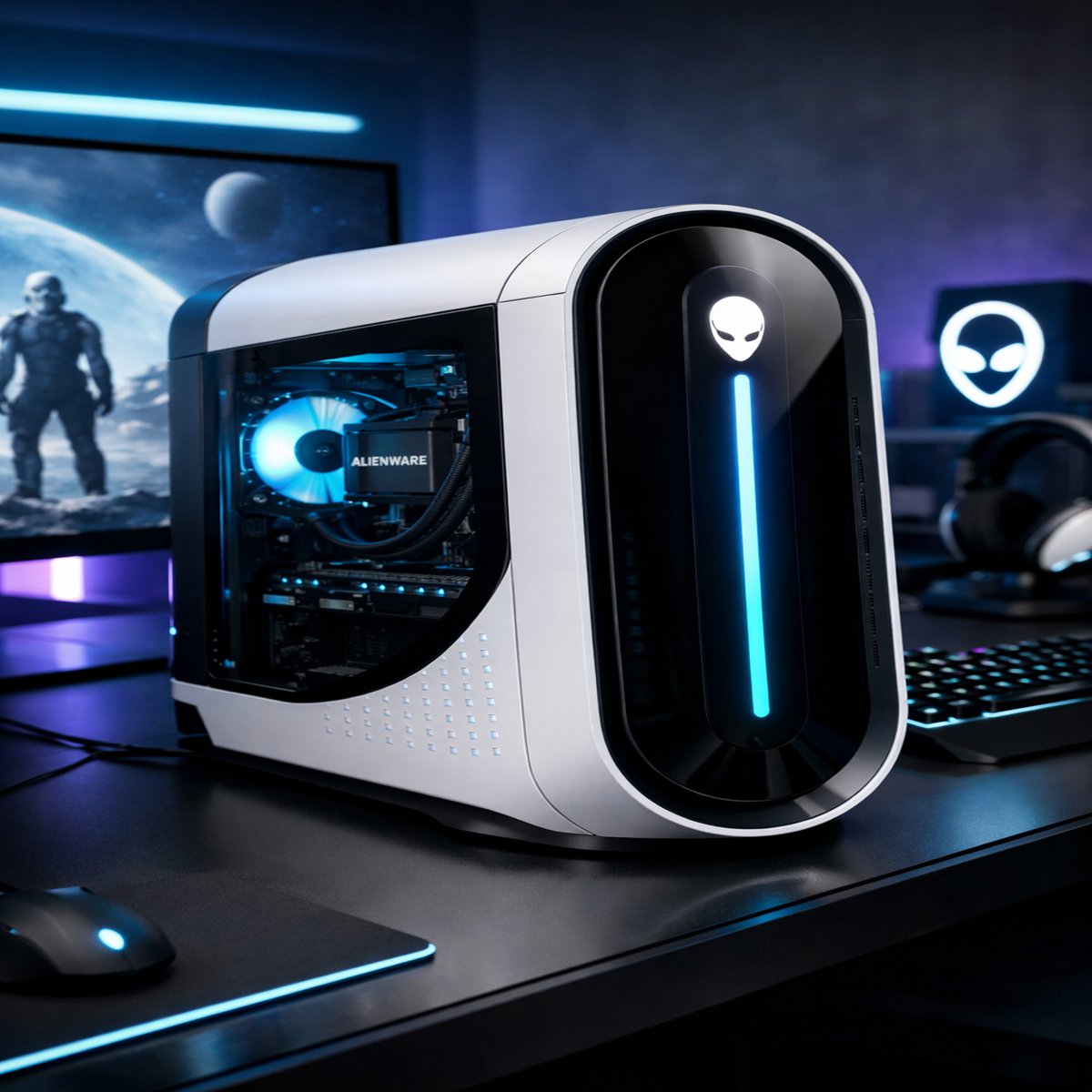
Another excellent product that is worth mentioning is the Alienware Aurora R13 gaming desktop by Dell. This machine offers impressive Intel 12th-gen processors, DDR5 memory, and high-end NVIDIA RTX graphics cards and supports 1080p, 1440p, and even 4K gaming.
Besides being highly performant, the Alienware Aurora R13 is notable for the advanced Legend 2.0 design, RGB lighting, and straightforward setup process. Nonetheless, a small case may lead to reduced air flow compared to bigger cases used when building custom PC and proprietary components cannot be easily replaced.
Conclusion: In conclusion, the Alienware Aurora R13 is an amazing product for newbies and gamers looking for a premium gaming desktop that works right out of the box, while seasoned PC builders will likely benefit more from customizing their own build.
Gaming PCs have evolved fast over the past few years. New GPUs, faster CPUs, and better cooling solutions make modern desktops incredibly powerful. But many gamers still ask the same question:
Should you buy a prebuilt gaming PC or build one yourself?
One of the most popular prebuilts on the market is the Alienware Aurora R13 from Dell. It promises strong performance, futuristic design, and easy upgrades. But does it really deliver?
In this Aurora R13 review, we’ll break down performance, design, cooling, upgrades, and real-world gaming results so you can decide if this gaming desktop is the right choice.
Design and Build Quality
The first thing you notice about the Aurora R13 is its unique case design.
4
Unlike traditional boxy PCs, the Aurora R13 uses a rounded “Legend 2.0” design language. The front panel features customizable RGB lighting and a smooth curved shape that makes it stand out on any desk.
Build highlights
Premium plastic + metal chassis
Tool-less side panel access
Customizable RGB lighting
Compact footprint for a gaming desktop
One practical advantage is accessibility. Opening the case is easy, which helps if you plan to upgrade components later.
However, the internal layout is still somewhat proprietary. That means not every off-the-shelf component will fit perfectly.
Quick insight: If aesthetics matter to you, the Aurora R13 is one of the most distinctive gaming PCs available.
Hardware and Specifications
The Aurora R13 comes in many configurations. Dell allows buyers to customize CPU, GPU, RAM, and storage.
Typical configurations include:
CPU options
Intel Core i5-12600KF
Intel Core i7-12700KF
Intel Core i9-12900KF
GPU options
NVIDIA RTX 3060
NVIDIA RTX 3070
NVIDIA RTX 3080
NVIDIA RTX 3090
Memory
16GB DDR5 (base)
32GB DDR5
64GB DDR5
Storage
512GB SSD
1TB SSD
2TB SSD
The biggest upgrade over older Aurora models is DDR5 memory support, which provides faster speeds and better future compatibility.
Real-world tip: If you’re buying this PC mainly for gaming, the i7 + RTX 3070 or 3080 configuration gives the best price-to-performance ratio.
Gaming Performance
Performance is where the Aurora R13 really matters. After all, this is a high-end gaming desktop.
Let’s look at typical results using an RTX 3080 configuration.
1080p gaming
Most modern games easily exceed 144 FPS.
Examples:
Cyberpunk 2077 – ~95 FPS (Ultra settings)
Call of Duty Warzone – 150+ FPS
Fortnite – 200+ FPS
1440p gaming
At 1440p, performance remains excellent.
Average results:
Cyberpunk 2077 – ~70 FPS (Ultra)
Elden Ring – 60 FPS locked
Apex Legends – 160 FPS
4K gaming
The RTX 3080 version can handle 4K gaming surprisingly well.
Typical results:
Cyberpunk 2077 – 45–55 FPS
Assassin’s Creed Valhalla – 60 FPS
Forza Horizon 5 – 70 FPS
Important note: Using technologies like NVIDIA DLSS can significantly boost performance at higher resolutions.
Cooling and Noise
Cooling has been a controversial topic for previous Alienware PCs. Older Aurora models sometimes ran hot due to tight internal space.
The R13 improves things with two cooling options:
Air cooling
Standard configuration with a large CPU air cooler.
Liquid cooling
Optional 120mm AIO liquid cooler for the CPU.
Liquid cooling is strongly recommended if you choose higher-end CPUs like the i7 or i9.
Noise levels
Under normal gaming load:
Fans remain moderate
GPU noise depends on the card model
Liquid-cooled versions run quieter
Still, the case airflow is not as strong as custom-built gaming towers.
Quick advice: Choose liquid cooling if available. It keeps temperatures lower and reduces fan noise.
Upgradability
One common concern with Alienware systems is upgrade flexibility.
The Aurora R13 allows upgrades for:
RAM
Storage
GPU
However, some parts are proprietary:
Motherboard
Power supply
Case layout
This means future upgrades may be slightly more limited compared to custom-built PCs.
That said, most gamers will be able to upgrade GPU and RAM easily, which are the upgrades that matter most.
Connectivity and Ports
The Aurora R13 includes a strong set of connectivity options.
Front ports
USB-C
USB-A
Headphone jack
Microphone jack
Rear ports
Multiple USB-A ports
USB-C
Ethernet
Audio outputs
Wireless connectivity includes:
Wi-Fi 6
Bluetooth
This makes it easy to connect gaming peripherals, headsets, or VR devices.
Software Experience
The system includes Alienware Command Center, which controls several features.
You can use it to:
Customize RGB lighting
Monitor CPU and GPU temperatures
Create performance profiles
Control fan speeds
The interface is fairly simple, even for beginners.
Some users uninstall extra pre-installed software, but the main tools are useful for managing the system.
Pros and Cons
Pros
Strong gaming performance
Unique futuristic design
DDR5 memory support
Easy setup for beginners
Good customization options
Cons
More expensive than building your own PC
Limited airflow compared to larger cases
Some proprietary components
Upgrades slightly restricted
Who Should Buy the Aurora R13?
This gaming PC works best for people who want powerful performance without building a PC themselves.
It’s a great choice for:
Beginners entering PC gaming
Gamers who want a ready-to-use system
Content creators needing strong GPU power
Users who prefer premium design
However, experienced PC builders may prefer building a custom system for better airflow and flexibility.
Aurora R13 vs Building Your Own PC
Many gamers debate this question.
Aurora R13 advantages
No assembly required
Professional cable management
Warranty and support
Clean aesthetic design
Custom PC advantages
Better cooling
Lower cost
Fully upgradeable parts
More component choices
If convenience matters more than customization, the Aurora R13 is a solid option.
FAQ: Aurora R13 Review
Is the Aurora R13 good for gaming?
Yes. With modern GPUs like the RTX 3070 or RTX 3080, the Aurora R13 delivers excellent performance for 1080p, 1440p, and even 4K gaming.
Can you upgrade the Aurora R13?
Yes, but with some limitations. You can upgrade:
GPU
RAM
Storage
However, the motherboard and power supply are proprietary.
Does the Aurora R13 run hot?
Temperatures are generally acceptable, especially with the liquid cooling option. Air-cooled configurations may run warmer during heavy gaming.
Is the Aurora R13 worth the price?
It depends on your priorities. If you want a ready-to-use gaming PC with premium design and solid performance, it’s a strong choice.
But DIY builders may find better value assembling their own system.
Final Verdict: Is the Aurora R13 Worth Buying?
The Alienware Aurora R13 remains one of the most recognizable gaming desktops available. It combines powerful hardware, a distinctive design, and the reliability of a major brand.
While it isn’t perfect—especially when it comes to airflow and upgrade flexibility—it still delivers excellent gaming performance and ease of use.
For gamers who want a high-end gaming PC without the hassle of building one, the Aurora R13 is a compelling option.
Bottom line: If you value convenience, style, and strong performance, the Aurora R13 is definitely worth considering.
✅ Next step: Before buying, compare different configurations and focus on GPU power first, since it has the biggest impact on gaming performance.